A team ships a simple sorting feature. Three sprints later, the codebase contains ElasticSearch integration, a tagging system, multi-level filters, and a favorites engine. Nobody asked for any of it.
This happens constantly. Teams confuse "more features" with "better product." The reasoning feels logical: users want options, options require features, therefore more features equal more value. But the data tells a different story.
What Feature Creep Actually Looks Like
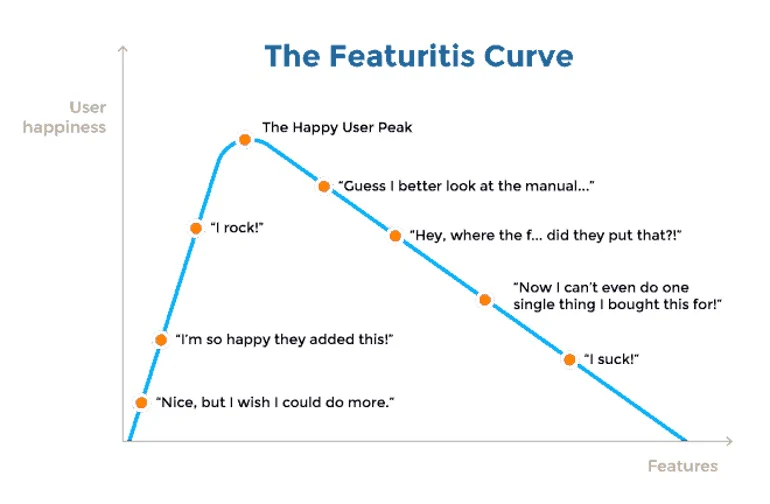
Feature creep — the uncontrolled expansion of a product's scope — starts small. A stakeholder requests "just one more thing." A developer adds a toggle "while they're in there." A PM spots a competitor's feature and panics.
Each addition feels harmless. Together, they bury the product.
The Nielsen Norman Group has documented this pattern across hundreds of usability studies: interface complexity correlates directly with lower task completion rates. When researchers at NNG tested e-commerce checkout flows, they found that removing optional fields increased completion by 26%.
The problem is not that individual features lack value. The problem is that value compounds negatively. Feature A is useful. Feature B is useful. Features A through Z together create a product nobody can navigate.
The Paradox of Choice: Why More Options Paralyze Users
In 2000, psychologists Sheena Iyengar and Mark Lepper ran an experiment at a grocery store in Menlo Park, California. They set up a jam-tasting booth. On some days, the booth offered 24 varieties. On other days, just 6.
The large display attracted more people — 60% of passersby stopped versus 40% for the small display. But when it came to buying? Only 3% of people at the large display purchased a jar. At the small display, 30% bought one.
Ten times the conversion rate. Fewer options, more action.
This effect — known as the paradox of choice, a term coined by psychologist Barry Schwartz in his 2004 book — shows up everywhere in software design. Every feature you add is another jar of jam. Every settings panel, another reason to close the app and do something else.
Five Products That Feature Creep Destroyed (Or Nearly Destroyed)
Google Wave (2009-2010)
Google Wave launched in May 2009 as a communication tool that combined email, instant messaging, document collaboration, and wiki-style editing into a single interface. The pitch sounded promising: replace five tools with one.
The result was incomprehensible. Users opened Wave and had no idea what to do first. Was it email? A chat room? A document editor? Google's own engineers struggled to explain it in a single sentence. Lars Rasmussen, Wave's co-creator, admitted in interviews that the product tried to do too much at once.
Google shut Wave down in August 2010, roughly 15 months after launch. The technology was sound. The product was unfocused.
Compare this to Slack, which launched in 2013 doing one thing: workplace chat. Slack did not try to replace email, documents, or wikis. It connected to them. By staying focused on real-time messaging and making integrations simple, Slack reached 10 million daily active users by 2019.
Evernote's Decline (2014-2018)
Evernote started as a note-taking app. Simple, fast, useful. By 2012, it had 100 million users and a $1 billion valuation.
Then Evernote started adding features. A food app called Evernote Food. A fashion app called Evernote Style. Physical products like branded socks and bags through an Evernote Market. A chat feature. A presentation mode. Work Chat. Context cards powered by machine learning.
Phil Libin, Evernote's CEO at the time, envisioned a "hundred-year company." Instead, the core note-taking experience degraded. The app became slow, buggy, and confusing. Users left for simpler alternatives like Apple Notes, Bear, and Notion.
By 2015, Evernote had laid off staff, closed offices, and replaced its CEO. The app still exists, but it never recovered its momentum. Chris O'Neill, who replaced Libin, told TechCrunch in 2016 that the company needed to "refocus on the core product."
Microsoft Clippy (1997-2007)
Microsoft's Office Assistant — the animated paperclip named Clippy — launched in Office 97. The idea was proactive help: Clippy watched what you typed and offered suggestions.
The problem was that Clippy interrupted constantly. Writing a letter? "It looks like you're writing a letter. Would you like help?" Formatting a table? Clippy had opinions. The feature inserted itself into workflows where users did not want assistance.
A 2001 Microsoft usability study found that the vast majority of users disabled the Office Assistant immediately. Steven Sinofsky, who led the Office division, later described Clippy as a case study in adding capability that reduced usability. Microsoft removed Clippy from Office in 2007.
The lesson was not that help features are bad. The lesson was that a feature nobody asked for — one that actively disrupted the user's task — made the entire product feel worse.
BlackBerry's Pivot to BBM Channels (2013)
BlackBerry Messenger was the original killer messaging app. Before WhatsApp, before iMessage, BBM gave BlackBerry users encrypted, delivery-confirmed messaging. It was simple and it worked.
In 2013, facing competition from WhatsApp and iMessage, BlackBerry launched BBM Channels — a social media feature layered on top of BBM. The company also opened BBM to Android and iOS, adding stickers, games, a news feed, and a payment system.
BBM went from a focused messaging tool to a bloated social platform trying to compete with Facebook, Twitter, and Snapchat simultaneously. Users who wanted simple messaging found a cluttered app. New users on Android and iOS had no reason to choose BBM over WhatsApp.
BlackBerry shut BBM down in 2019.
Snapchat's Redesign (2018)
In February 2018, Snapchat rolled out a major redesign that merged Stories from friends with content from publishers and influencers. The app shuffled features around, burying familiar navigation patterns under new ones.
User backlash was immediate. A Change.org petition demanding a rollback gathered 1.2 million signatures. Kylie Jenner tweeted "sooo does anyone else not open Snapchat anymore?" — and Snap's stock dropped $1.3 billion in market value the same day, as reported by Bloomberg.
The redesign did not add new features. It rearranged existing ones into a less intuitive layout. Snap lost 3 million daily active users in Q1 2018 and spent the next year reverting changes.
The Psychology Behind the Problem
Decision Fatigue Is Real
Roy Baumeister's research on ego depletion, published in the Journal of Personality and Social Psychology, demonstrated that making decisions drains mental energy. Each choice a user faces in your interface — no matter how small — costs cognitive resources.
A study by Forrester Research found that users completed tasks 20% more often when interfaces removed unnecessary options. The effect was strongest for first-time users, who have no muscle memory to fall back on.
Hick's Law Quantifies the Damage
Hick's Law, formulated by psychologists William Hick and Ray Hyman in 1952, states that decision time increases logarithmically with the number of options. Double the options, and you do not double the decision time — but you measurably increase it.
In practical terms: a settings screen with 5 options takes noticeably less cognitive effort than one with 15 options, even when the user knows exactly what they want. The mere presence of irrelevant options slows the brain down.
The Kano Model Explains Feature Value
Noriaki Kano's model, developed in the 1980s at Tokyo University of Science, categorizes features into three types:
- Must-haves: Features users expect. No file upload in a cloud storage app? They leave.
- Performance features: More is better, linearly. Faster sync speed directly increases satisfaction.
- Delighters: Unexpected features that create joy — but only when the must-haves work flawlessly.
Most feature creep adds low-value performance features while neglecting must-haves. Teams ship a chatbot before fixing the search function. They add gamification before the onboarding flow makes sense.
What Focused Products Do Differently
Dropbox: One Job, Done Well
Dropbox launched in 2008 with a single promise: your files, synced across devices. Drew Houston, Dropbox's co-founder, famously demonstrated the product with a screencast showing a file appearing on two computers simultaneously.
Dropbox resisted adding editing tools, project management, or social features for years. When the company expanded — adding Paper for documents, then acquiring DocSend — each addition targeted the same core user need: getting work done with files.
Superhuman: Deliberate Constraints
Superhuman, the email client that launched in 2017, charges $30 per month and maintains a waitlist. The product does far less than Gmail — no labels, limited integrations, keyboard-only navigation.
Rahul Vohra, Superhuman's CEO, described the approach in a 2019 First Round Review article: the team measures "product-market fit score" by asking users how disappointed they would be if the product disappeared. Features that do not increase that score get cut, regardless of how "useful" they seem in isolation.
Basecamp: Anti-Feature Philosophy
Basecamp has publicly documented its approach to feature development. Jason Fried and David Heinemeier Hansson, the company's founders, wrote in their book "Shape Up" that they deliberately say no to feature requests — even popular ones. Their framework: if a feature requires ongoing maintenance that outweighs its value, it does not ship.
Basecamp has been profitable since its founding in 2004 without venture capital funding, serving the same core project-management use case for over two decades.
How to Resist Feature Creep
1. Define the Job the Product Does
Clayton Christensen's "Jobs to Be Done" framework asks: what job did the user hire this product to do? A taxi app's job is to get someone from point A to point B. Gamification, social features, and loyalty programs do not help that job.
Before adding any feature, ask: does this help the user do the job they hired us for? If the answer requires more than one sentence of explanation, the feature probably does not belong.
2. Measure What Removing Features Does
In 2012, the design agency Experiment tested removing the sidebar navigation on a client's e-commerce site. Conversion rates went up 26%. The sidebar had given users more options — and more reasons to leave the purchase flow.
Run subtraction experiments. Remove a feature for 10% of users and measure engagement, task completion, and satisfaction. You may find that less performs better.
3. Use the "Hell Yes or No" Rule for Features
Derek Sivers, the founder of CD Baby, describes a decision-making rule: if something is not a clear "hell yes," it is a no. Applied to product development: if a feature does not obviously serve the core use case, skip it.
This sounds extreme. It is. That is the point. The default pressure in product development pushes toward addition. You need a strong counterforce to maintain focus.
4. Set Feature Budgets
Some teams cap the total number of features or interface elements in their product. If adding a new feature means removing an existing one, the team must decide which matters more.
This forces trade-offs. Trade-offs produce focus. Focus produces products people actually use.
The Counterintuitive Truth
Products fail more often from doing too much than from doing too little. Google Wave failed because it combined five tools into one. Evernote declined because it chased features instead of fixing notes. Clippy annoyed millions because Microsoft added help nobody wanted.
The most successful products in recent software history — Dropbox, Slack, Basecamp, Superhuman — share one trait: they do less than their competitors. They just do it better.
The discipline is not in building. The discipline is in choosing what not to build.