In 2020, low-code was the future. Bubble, Webflow, and a dozen similar platforms promised to democratize software development. Build your SaaS without writing code. Launch in weeks, not months. Skip the expensive developer salaries.
Five years later, the promise has soured for thousands of startups. What looked like a shortcut became a dead end. And ironically, the very thing that was supposed to replace developers — artificial intelligence — is now reshaping what it means to be one.
This article examines why low-code hit its ceiling, what "vibe coding" means for the industry, and how developers should position themselves for the AI-augmented future.
The Low-Code Promise (And Where It Broke)
Low-code platforms delivered exactly what they advertised — for a while. Non-technical founders could build functional MVPs. Internal tools got shipped in days instead of quarters. The global low-code development platform market grew toward a projected $65 billion by 2027.
But here is the uncomfortable truth the marketing glossed over: 86.3% of developers surveyed in 2024 did not use any low-code platforms. And 67.1% said they did not use any no-code solutions either. The adoption rate among professional developers remained remarkably low despite years of industry hype.
Why? Because professionals recognized what the platforms could not admit: these tools are designed for simplicity, not scale.
The Scalability Wall
Bubble, the most popular no-code platform for web applications, hits what developers call "the no-code ceiling" when applications grow beyond initial validation stages.
Consider a real scenario that plays out repeatedly in the startup world: A SaaS company builds its MVP on Bubble. Growth is strong. They reach 5,000 users, then 8,000. Performance starts degrading. Database queries slow down. Complex workflows become brittle and prone to random failures. Users report lag. The engineering team (if one even exists) cannot optimize because they do not control the underlying infrastructure.
Forum discussions on Bubble are filled with users reporting "workload" issues even when using external databases like Supabase. Some report performance problems when pulling just 20 items from a database. For applications expecting to handle 100,000+ users, the platform's architecture simply was not designed for that level of scale.
Webflow faces similar constraints, though in different ways. Built for marketing sites and e-commerce, it excels there. But it requires third-party integrations for any serious application logic, and those integrations add complexity, cost, and potential failure points.
The Vendor Lock-In Nightmare
Here is the brutal reality that every Bubble founder eventually confronts: there is no code export feature.
Read that again. You cannot export your application and move it elsewhere. The platform owns the underlying source code. Your application exists only within Bubble's ecosystem.
This creates what one developer described as a "migration nightmare." If Bubble changes its pricing (which it has done), if the platform evolves in a direction that does not serve your use case, or if you simply outgrow the platform's capabilities — you face a complete rebuild from scratch.
One case study documented a startup whose tangled architecture — with tightly coupled front-end, back-end, and database all inside Bubble — made scaling or debugging impossible. Heavy reliance on third-party APIs drained budgets. Custom functionality clashed with platform limitations, causing frequent failures. The team could not optimize infrastructure or plan a long-term roadmap without full control.
The True Cost of Migration
What does it cost to escape the low-code trap?
The numbers vary based on application complexity, but the pattern is consistent: migration from Bubble to custom code typically runs $50,000 to $150,000 for moderately complex applications. And that is not an upgrade — it is a complete rebuild, because nothing transfers.
One company documented reducing hosting costs by 40% after migrating from Bubble and Heroku to AWS. But they first had to pay for the entire rebuild.
For startups that raised money assuming Bubble would scale with them, this unplanned expense can be fatal to runway. Investors increasingly view Bubble's proprietary nature as a red flag, especially for Series A or B rounds where valuations exceed $1 million. The lack of transparency and scalability proof creates genuine strategic risk.
Enter Vibe Coding: The New Paradigm
While low-code was hitting its ceiling, something unexpected was emerging: AI-assisted development that actually works.
In February 2025, Andrej Karpathy — co-founder of OpenAI and former AI leader at Tesla — coined the term "vibe coding." He described it as "fully giving in to the vibes, embracing exponentials, and forgetting that the code even exists."
The concept resonated immediately. Collins Dictionary named it Word of the Year for 2025. Searches for the term jumped 6,700% in spring 2025.
By year's end, Y Combinator reported that 25% of startups in its Winter 2025 batch had codebases that were 95% AI-generated. Top engineering teams reported 85-90% daily usage rates for AI coding assistants. These were not low-code workarounds — they were actual codebases, generated through natural language interaction with AI.
What Vibe Coding Actually Looks Like
Vibe coding is not low-code with better marketing. It is a fundamentally different approach:
Low-code constrains you to pre-built blocks within a proprietary visual interface. You drag and drop. The platform decides what you can and cannot build.
Vibe coding uses AI to generate actual source code based on natural language descriptions. You own the code. You can modify it. You can deploy it anywhere. The AI is an assistant, not a jailer.
Projects using vibe coding report productivity gains of up to 55% faster completion times. But — and this matters — the gains require developers who understand what they are asking for and can evaluate what they receive.
The Vibe Coding Hangover
Not everyone is celebrating.
In May 2025, Lovable, a Swedish vibe coding application, was found to have security vulnerabilities in code it generated. Out of 1,645 applications built on the platform, 170 had issues that would allow personal information to be accessed by anyone.
By September 2025, Fast Company was reporting the "vibe coding hangover." Senior software engineers cited "development hell" when working with AI-generated codebases they did not understand.
A METR study delivered a surprising finding: when experienced developers used AI tools, they actually took 19% longer to complete tasks than without AI. Developers predicted AI would make them 24% faster. They perceived themselves as 20% faster. The reality was the opposite.
The Harness State of Software Delivery 2025 found that 67% of developers spend more time debugging AI-generated code than they do writing code manually.
The lesson is clear: vibe coding works, but only when the developer understands architecture, can evaluate AI output critically, and knows when to override the machine.
The New Developer Tools Landscape
The tools enabling this shift are worth understanding in detail.
Cursor: The New Baseline
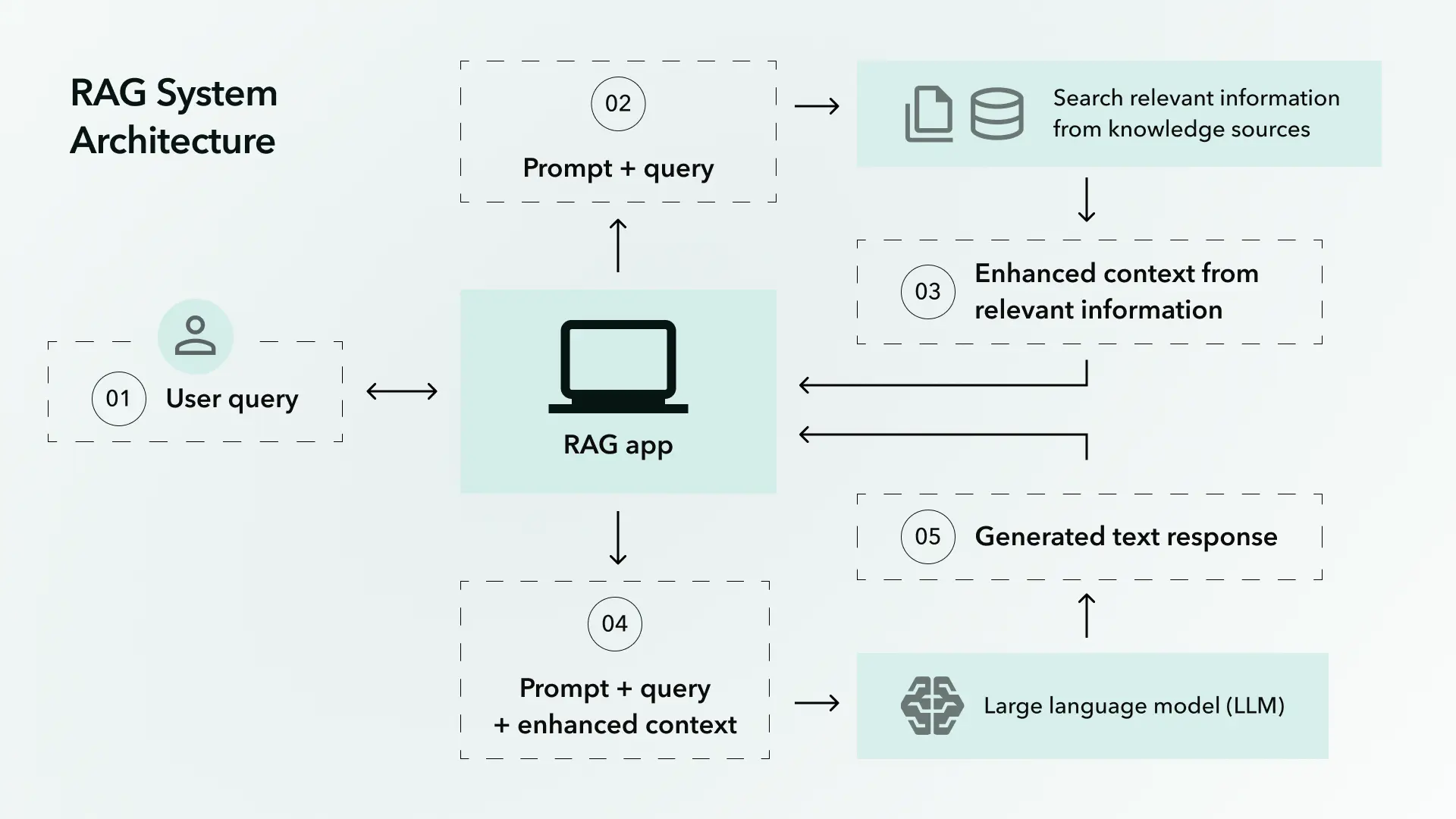
Cursor has become the tool that other AI coding assistants are measured against. It is a fork of VS Code that indexes your local codebase using retrieval-augmented generation (RAG) and integrates "Shadow Workspaces" to predict your next edit.
Its core features include Composer for multi-file editing and Tab for predictive edit acceptance. Autocomplete feels fast. Chat lives directly inside the editor. Small-to-medium tasks — feature tweaks, refactors, tests, bug fixes — are handled with minimal friction.
Cursor reached a $9 billion valuation. Pricing is $20/month for Pro, with enterprise seats around $200/month.
Claude Code: Intelligence Over Flow
If Cursor is about flow, Claude Code is about thinking.
Claude Code excels at reasoning tasks — architecture decisions, complex refactoring, documentation, code review. Community benchmarks show it handling codebases over 50,000 lines of code roughly 75% of the time.
The underlying model, Claude Sonnet 4.5, achieves a 77.2% solve rate on SWE-bench, a benchmark for real-world software engineering tasks. Access comes through Anthropic's subscriptions at approximately $20/month for individuals.
GitHub Copilot: The Incumbent
Copilot reached 15 million developers by early 2025 and remains the most widely adopted AI coding tool. Originally built on OpenAI's Codex, it now supports multiple models including Claude 3 Sonnet and Gemini 2.5 Pro.
Its 2025 features include Agent Mode for repository-level automation and next edit suggestions. What keeps Copilot competitive is frictionlessness — inline suggestions are fast, agent mode handles many common tasks, and it integrates cleanly into enterprise environments.
At $10/month, it is also the most affordable premium option.
The Emerging Pattern
Most experienced developers do not rely on a single tool. The emerging workflow looks like this:
- Cursor as the primary IDE for daily coding
- Copilot for speed and repetitive tasks
- Claude for architecture thinking, reviews, and complex reasoning
- v0.dev for rapid UI component generation
The best developers compose AI tools like building blocks, selecting the right assistant for each type of task.
From Code-Writer to System Orchestrator
This shift in tooling reflects a deeper transformation in what developers actually do.
GitHub research projects that by 2030, AI-driven productivity gains could add the equivalent of 15 million effective developers to the global workforce, unlocking more than $1.5 trillion in economic value. But those gains do not come from AI writing code while humans watch.
As one industry analysis put it: "Developers' roles are evolving from manual coders to orchestrators of AI-driven development ecosystems."
The new role emphasizes:
Validating AI outputs — Understanding what the AI generated, whether it will actually work at scale, and where the subtle bugs are hiding.
Orchestrating deployments — Coordinating multiple AI agents and tools into coherent development workflows.
Communicating outcomes — Translating technical decisions for business leaders who increasingly need to understand AI-assisted development.
Designing systems — Architecture knowledge becomes more valuable, not less, when AI can generate code but cannot understand the bigger picture.
The job market reflects this. AI orchestration frameworks like LangChain, CrewAI, and Ray have become foundational knowledge for modern development teams. The demand is for developers who can design, prompt, and supervise intelligent agents across dynamic networks of tasks.
What Skills Actually Matter Now
The 2025 Stack Overflow Developer Survey revealed that only 16.3% of developers said AI made them more productive "to a great extent." The largest group — 41.4% — said it had little or no effect.
The difference comes down to skill application. Here is what separates developers who benefit from AI from those who struggle:
System Design Knowledge
AI can generate functions. It cannot design systems. Understanding how components should interact, where to place boundaries, how to handle failure modes, what will scale and what will not — this remains deeply human work.
The developers hitting walls with AI-generated code are often the ones who skipped architecture fundamentals. The code compiles but the system does not cohere.
Prompt Engineering (Real Version)
This is not about learning magic phrases. It is about understanding how to decompose problems, provide context, specify constraints, and iterate on outputs.
Effective prompts require understanding what you want and why. That requires domain knowledge — you cannot engineer a good prompt for a database schema if you do not understand database design.
Critical Evaluation
The 67% of developers spending more time debugging AI code than writing manual code are failing at evaluation. They accept generated code without understanding it.
The skilled approach: treat AI output like code from a junior developer. It might be correct. It might be catastrophically wrong. Review everything before it ships.
Integration Orchestration
Modern applications are not single codebases — they are ecosystems of services, APIs, databases, and infrastructure. AI tools help with individual components but struggle with integration complexity.
Developers who can orchestrate — connecting AI-generated components into working systems — are the ones delivering real productivity gains.
Practical Guidance: What Should You Do?
If You Are on Low-Code Now
Assess honestly: How many users do you have? How complex are your workflows? If you are under 1,000 users with relatively simple logic, low-code might serve you for a while longer.
But start planning your exit. Adopt an API-first mindset — design systems so data and business logic can be called via APIs from any platform. Keep database schemas clean, normalized, and well-documented. Regular backups with exportable data models are not optional.
Budget for migration. If your startup plans to scale, that $50,000-$150,000 rebuild is coming. Better to plan for it than be surprised.
If You Are Building Something New
Skip the low-code platforms entirely for anything you expect to scale. The initial speed advantage evaporates when you hit the wall at 8,000 users and face a complete rebuild.
Instead, use AI-assisted development with actual code. Cursor plus Claude Code plus Copilot will get you to MVP faster than Bubble while producing code you own and can scale.
The exception: internal tools with limited user bases and no scaling requirements. Low-code still makes sense there.
If You Are a Developer Positioning for the Future
Learn the new tools. Cursor, Claude Code, Copilot are not optional anymore. 85% of developers use AI tools daily.
Deepen architecture knowledge. System design separates developers who leverage AI from those replaced by it. Invest in understanding distributed systems, database design, security patterns.
Practice AI collaboration. Treat AI tools as a junior colleague. Learn to direct them effectively, review their output critically, and know when to override.
Build orchestration skills. LangChain, agent frameworks, multi-tool workflows — these are becoming baseline expectations.
The definition of "developer" has expanded to include people who rely on prompting rather than programming. That is not a threat to skilled developers — it is an opportunity for those who can do both.
The Real Lesson
Low-code platforms failed not because they were bad products, but because they promised the wrong thing. They promised that software could be built without understanding software. They sold speed without mentioning the destination.
Vibe coding promises something different: that AI can handle the routine parts of coding while humans focus on the hard problems that require judgment, creativity, and understanding.
That promise has more truth in it. But only if developers maintain those capabilities.
The tools have changed. The need for genuine technical understanding has not. If anything, it has increased — because now you must understand not just your code, but what the AI generated, why it made those choices, and where it went wrong.
The developers thriving in 2025 are not the ones who abandoned coding for visual builders. They are the ones who learned to orchestrate AI while maintaining the deep knowledge that makes orchestration possible.
That is the evolution. Not from developer to non-developer. From code-writer to system orchestrator.
The keyboard did not disappear. The job description expanded.
The BrightByte helps companies navigate the transition from low-code constraints to scalable, AI-assisted development. Whether you need to migrate an existing application or build something new the right way, our team combines deep technical expertise with practical experience in modern AI tooling. Contact us to discuss your project.